---
title: How do I start creating a new template?
description: Learn about the first step in template creation
---
[Skip to content](https://help.precisely.se/en/how-do-i-start-creating-a-new-template#main-content)
[](https://preciselycontracts.com/)
Open main navigation
Close main navigation
- [Go to preciselycontracts.com](https://preciselycontracts.com/)
[Go to preciselycontracts.com](https://preciselycontracts.com/)
Hello! How can we help you?
- There are no suggestions because the search field is empty.
1. [Help Center](https://help.precisely.se/en?hsLang=en)
2. [Automated Templates & Documents](https://help.precisely.se/en/automated-templates-documents?hsLang=en)
3. [Building & Managing Templates](https://help.precisely.se/en/automated-templates-documents?hsLang=en#building-managing-templates)
# How do I start creating a new template?
## Learn about the first step in template creation
When [creating automated templates](https://help.precisely.se/en/articles/386056-creating-automated-templates?hsLang=en), the first step is deciding if you want to take advantage of already existing content, or prefer to start from blank and create everything manually.
You can choose between three ways of creating a template:
- **Start from scratch by creating a blank document**
- **Use one of your existing Precisely templates and duplicate it to create a new one**
- **Upload a document from your computer**
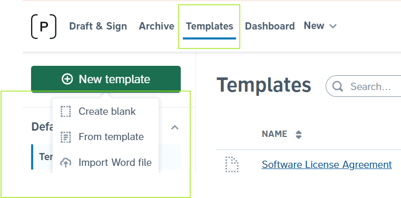
Click *Templates* in the top menu and click the green *New template* button on the top left, and select how you'd like to start with your template creation.
### Create a blank template document
You can start from scratch by clicking the *Create blank* button.
### Create a new template by copying another one
If you already have a template in your Precisely organization that is similar to the one you're trying to create, you can simply create a copy by clicking *From template.*
### Upload a Word file
Before using Precisely, you probably worked with some templates in Word. You can easily upload these documents in Precisely! Simply click *Import Word file* and select a .**docx** file from your computer. Then, you're able to choose if you want the the content of the document to be added as it is, or if you want some references to already be automatically created.
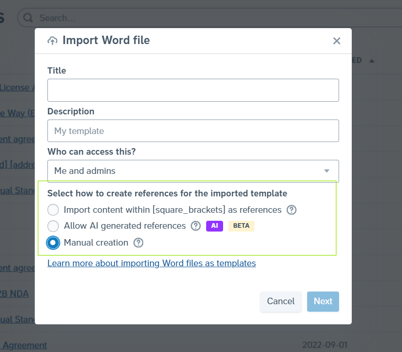
If you import a **Word file (.docx)**, your variable partsof a contract can be automatically converted into Precisely references. You can do it in two different ways:
- Let Precisely convert \[square\_brackets\_content\] into a Precisely references+questions
- Let **Precisely AI** automatically detect and create references and questions for you
👉 [Read more](https://help.precisely.se/en/how-to-convert?hsLang=en) about converting your external files into Precisely's smart templates.
### **💡PRO TIP: Copy a template from another organization**
If you're an experienced Precisely user with Admin role that works with multiple entities (= organizations in Precisely), you can also copy templates between organizations.
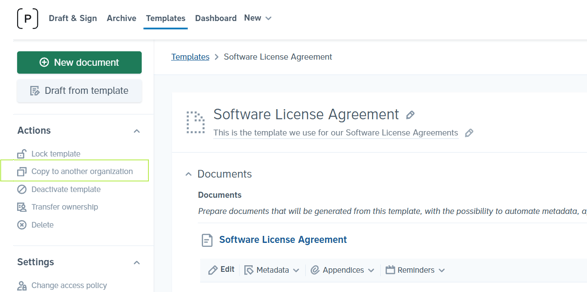
👉 [Learn more](https://help.precisely.se/en/articles/1471400-how-do-i-copy-a-template-from-one-organization-to-another?hsLang=en) about copying a template from one Precisely organization to another.
*Wondering about the next steps in template automation? [In this article](https://help.precisely.se/en/articles/386056-creating-automated-templates?hsLang=en), you'll learn all about creating automated templates in Precisely.*
- [The Precisely Platform: Key Features & Tools](https://help.precisely.se/en/the-precisely-platform-key-features-tools?hsLang=en)
- [Automated Templates & Documents](https://help.precisely.se/en/automated-templates-documents?hsLang=en#main-content)
- [Building & Managing Templates](https://help.precisely.se/en/automated-templates-documents?hsLang=en#building-managing-templates)
- [Working with References](https://help.precisely.se/en/automated-templates-documents?hsLang=en#working-with-references)
- [Conditional Logic & Automation](https://help.precisely.se/en/automated-templates-documents?hsLang=en#conditional-logic-automation)
- [Formatting & Content Styling](https://help.precisely.se/en/automated-templates-documents?hsLang=en#formatting-content-styling)
- [Collaboration & Negotiation](https://help.precisely.se/en/automated-templates-documents?hsLang=en#collaboration-negotiation)
- [Document Management & Versioning](https://help.precisely.se/en/automated-templates-documents?hsLang=en#document-management-versioning)
- [Precisely Archive](https://help.precisely.se/en/automated-templates-documents?hsLang=en#precisely-archive)
- [Control & Compliance](https://help.precisely.se/en/control-compliance?hsLang=en#main-content)
- [Access & Permissions](https://help.precisely.se/en/control-compliance?hsLang=en#access-permissions)
- [Approval Automation](https://help.precisely.se/en/control-compliance?hsLang=en#approval-automation)
- [Monitoring & Logs](https://help.precisely.se/en/control-compliance?hsLang=en#monitoring-logs)
- [Reviewer Permissions & Notifications](https://help.precisely.se/en/control-compliance?hsLang=en#reviewer-permissions-notifications)
- [Security & Authentication](https://help.precisely.se/en/control-compliance?hsLang=en#security-authentication)
- [Template & Draft Control](https://help.precisely.se/en/control-compliance?hsLang=en#template-draft-control)
- [Precisely's AI Features](https://help.precisely.se/en/preciselys-ai-features?hsLang=en#main-content)
- [Precisely's AI Assistant](https://help.precisely.se/en/preciselys-ai-features?hsLang=en#preciselys-ai-assistant)
- [FAQs & Troubleshooting](https://help.precisely.se/en/faqs-troubleshooting?hsLang=en#main-content)
- [Getting Started & Account Settings](https://help.precisely.se/en/faqs-troubleshooting?hsLang=en#getting-started-account-settings)
- [Draft & Sign](https://help.precisely.se/en/faqs-troubleshooting?hsLang=en#draft-sign)
- [E-Signing](https://help.precisely.se/en/faqs-troubleshooting?hsLang=en#e-signing)
- [Users & Permissions](https://help.precisely.se/en/faqs-troubleshooting?hsLang=en#users-permissions)
- [Language Settings](https://help.precisely.se/en/faqs-troubleshooting?hsLang=en#language-settings)
- [General Information](https://help.precisely.se/en/faqs-troubleshooting?hsLang=en#general-information)
- [Integrations](https://help.precisely.se/en/integrations?hsLang=en#main-content)
- [Precisely's API](https://help.precisely.se/en/integrations?hsLang=en#preciselys-api)
- [Precisely's Microsoft Outlook Integration](https://help.precisely.se/en/integrations?hsLang=en#preciselys-microsoft-outlook-integration)
- [Custom SMTP](https://help.precisely.se/en/integrations?hsLang=en#custom-smtp)
- [Electronic Signature](https://help.precisely.se/en/electronic-signature?hsLang=en#main-content)
- [Signing Providers & Methods](https://help.precisely.se/en/electronic-signature?hsLang=en#signing-providers-methods)
- [National eID Integrations](https://help.precisely.se/en/electronic-signature?hsLang=en#national-eid-integrations)
- [Pricing, Privacy & Terms](https://help.precisely.se/en/pricing-privacy-terms?hsLang=en)
- [New in Precisely](https://help.precisely.se/en/new-in-precisely?hsLang=en)
[](https://www.preciselycontracts.com)
Precisely's Help Center
Copyright © 2025, Precisely AB